Accessible Websites & AEM: WCAG is no longer optional
June 2025 brought significant accessibility news: all digital services (websites, mobile applications, e-commerce platforms, and internet banking platforms) must comply with WCAG (Web Content Accessibility Guidelines) standards, ensuring that no user is disadvantaged due to their disability. To avoid legal issues, it must be barrier-free, with few exceptions.
Putting the legal requirements aside, a website should still be fully accessible to ensure access to a wider audience, regardless of impairment, because brand reputation matters.
Some CMS (Content Management Systems), such as AEM (Adobe Experience Manager), make this process easier.

Digital barriers
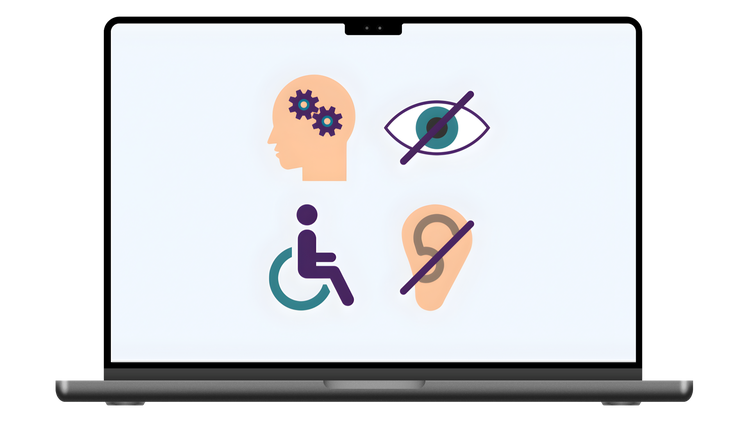
Visual: Some people navigate websites only relying on screen readers, or are affected by color blindness. Here comes the need for suggestive headings and labels, as well as good contrast.
Auditory: Users can either have a permanent hearing impairment or navigate the app in a noisy, busy environment, so videos and interactive content must provide captions and subtitles.
Motor: app users could have fine motor issues, or just a broken arm, so relying on the keyboard comes in.
Cognitive: People who have difficulty focusing may be distracted by complex layouts and heavy wording, so a clean design ensures consistency and usability.
Technical: incompatibility with certain devices or software.
WCAG & Legal requirements
The EAA (European Accessibility Act) requires all digital services to match WCAG 2.2 accessibility standards. It is structured into 4 Principles, 13 Guidelines, and 86 Success criteria.
To be accessible, content on a website must be presented in a way all users can perceive, all interactive elements must be operable, it has to be clear and understandable, and at the same time robust so it’s compatible with various assistive technologies.
The WCAG success criteria are grouped by conformity levels: A (basic), AA (moderate), and AAA (high). Level A and AA are legally required, while AAA is optional but desired for maximum accessibility.
Generic guidelines
Keyboard first: a web page must be used without a mouse, too, so the best way to test this is to go through it with the keyboard. If it’s not possible, it needs more work.
Contrast & Fonts: users need a good font and contrast that can be scaled and adjusted to their needs.
ARIA overuse: ARIA attributes aid a lot, but most of the time, the native element is just better. It’s worth investing more time in native elements usage to reduce code and provide the best user experience.
Constant testing: mistakes and omissions should be caught early in the development process. Tools like Lighthouse and Silktide catch and report what’s non-compliant.
AEM & WCAG - How to reuse and scale?
AEM is a complex technical solution, and if it’s set up right, accessibility becomes easy to maintain, reuse, and scale.
The main factor here is the core components that come with built-in accessibility functionalities.
Button: keyboard navigation, aria labels, and semantic markup
Image: fields for alt text and captions that can be made mandatory through policies
Carousel: keyboard navigation and aria attributes
Accordion: keyboard functionality for expand and collapse actions
Forms: correct label association, checkboxes, and error handling
With these core components, developers already have a solid base with built-in accessibility that follows the WCAG 2.2 legal requirements, and from here on, custom components are easy to extend.
Accessibility can be enhanced by adjusting core or custom components to have required fields for alt text or aria attributes that are easily applied and changes across designated website areas. Keyboard functionality can also be perfected or customized.
Creating templates can structure landmarks, headings, hierarchies, and overall page layouts to provide a clear and organized experience. When accessibility is correctly built on the component or template level, it scales across every page, market, or language that uses it.
Both authors and developers play a big role in how accessibility functions across the website, as they are of equal importance. Developers build complex and accessible components by expanding core functionalities that can be reused, but authors must provide a clear layout, readable content, and a natural user experience.
How does digital accessibility benefit everyone?
Expanded target audience: having a website that complies with WCAG norms makes it accessible to everyone, even if it’s a regular user navigating with one hand on the bus, or a permanently impaired person.
Improved usability and user experience: a clean navigation, good contrast, and meaningful semantics help everyone, not just the screen reader.
Better code: building with accessibility in mind from the early stages helps deliver code that is structured, easy to maintain, and technical debt-free.
Enhanced SEO: search engines love an accessible website as they rely on semantics, so having the right headings and aria labels might just help the website be discovered.
Better image: demonstrates social responsibility and inclusion, as it cares about all possible users.
Higher customer satisfaction: websites that are easy to use and accessible are valued and therefore recommended to others, boosting engagement and sales.
Legal compliance: if it meets legal requirements, it avoids penalties, as it’s no longer optional.
We need accessibility to create a website that everyone can use, regardless of whether they have certain impairments or not. Naturally, applications are considered inclusive if they have clear navigation flow, good contrast, readable content, optimized layout, and sufficient alternative information for users relying on assistive technologies.
With AEM, building such an application is easier, as it sustains reusability and provides a core component with built-in accessibility functionalities. With this, developers and authors already have a good foundation to start creating an inclusive website that checks the WCAG 2.2 standards and ensures consistency across all pages.