A Window into the Context of AI

Imagine hiring the world's smartest assistant — encyclopedic knowledge, lightning-fast responses, never complains about your endless demands. There's just one catch: they have the memory of a goldfish with a concussion. That's the context window limit in a nutshell.
Every time you chat with an AI, it's essentially like writing and reading instructions and results from a scroll. A really long, impressive scroll. But the scroll has an end. And when your conversation gets too long? The beginning of the scroll gets chopped off to make room for the new stuff — silently, dramatically, and without anyone realizing when it happens.
So you might spend an hour carefully explaining your entire project, your goals, your life story, and your strong opinions about tabs versus spaces — only for the AI to cheerfully forget you even have a project by message 47. It's not personal. It's math. Attention scales badly, memory is expensive, and inference gets slower the longer the scroll gets.
Think of the context window as the AI's working memory, its RAM, its "things I'm currently pretending to care about" buffer. Fill it up, and something old has to go. Usually, the stuff you assumed would always be remembered.
In short, the context window limit is why your AI assistant is brilliant, tireless, and occasionally has absolutely no idea what you've been talking about for the last three hours.
Before we start complaining that AI doesn’t do what we want, we need to understand how it works — and how to use it intelligently.
What Is a Context Window?
The context window is a fundamental concept in AI, particularly in large language models (LLMs). It refers to the maximum amount of text, measured in tokens, that an AI model can process and use at one time when generating a response.
A context window is the maximum amount of text (measured in tokens — in English, roughly 1 token ≈ 0.75 words) that a language model can process in a single interaction. Everything the model “sees” — your instructions, conversation history, uploaded documents, tool outputs, and its own previous responses — must fit within this window. Anything outside it is not available to the model during generation.
Each AI model has a fixed maximum context window defined by its architecture and configuration. When the total number of tokens exceeds this limit, earlier content must be truncated, summarized by the surrounding system, or otherwise removed before the model can continue.
Context Window Limits in AI Agents
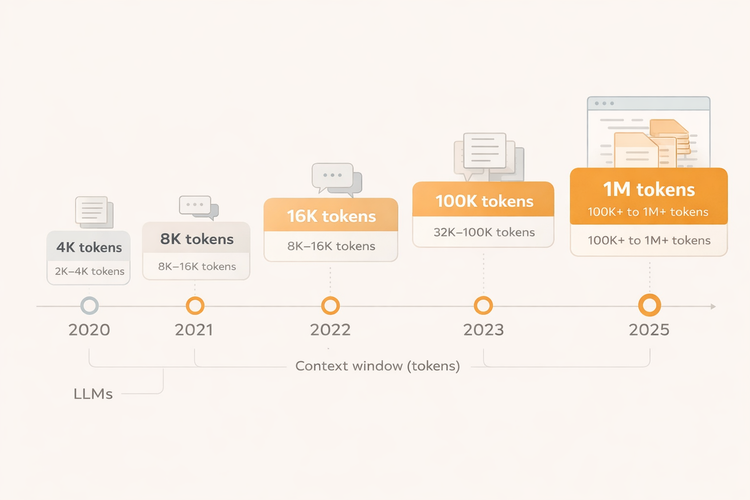
How the Major Models Stack Up
GPT-4o (OpenAI) supports up to 128,000 tokens — enough for a small novel.
Claude 3.5 / Claude 3 Opus (Anthropic) offers up to 200,000 tokens, one of the largest windows available, capable of ingesting hundreds of pages of documents.
Gemini 1.5 Pro (Google) pushes boundaries further with a 1 million-token context window, and experimental versions have reached 2 million tokens.
Llama 3 (Meta, open-source) supports up to 128,000 tokens in its larger variants.
Mistral Large offers around 32,000 tokens, more modest but still capable for most tasks.
Strategies for Working Around Limits
Developers have devised several approaches to manage context constraints:
Summarization involves periodically compressing older parts of a conversation into a concise summary, reducing token usage while preserving key information and maintaining continuity.
Retrieval-Augmented Generation (RAG) sidesteps the problem by storing information externally in a vector database and fetching only the most relevant chunks at query time, inserting them into the model’s context during generation instead of cramming everything into the window at once.
Memory systems allow agents to write important facts to persistent storage and recall them later, effectively mimicking long-term memory at the application layer — something the context window alone cannot provide.
Chunking breaks large tasks or documents into smaller segments processed sequentially, with intermediate outputs passed forward or combined into a final result.
The Bigger Picture
Context window size is not the only metric that matters — longer contexts can introduce their own challenges, including increased latency, higher computational cost, and the "lost in the middle" phenomenon, where models struggle to attend to information buried in the center of a very long context.
Still, the trend is clear: context windows are growing, and as they do, AI agents become capable of tackling longer, more complex, and more nuanced tasks. Understanding these limits — and how to work around them — remains essential for anyone building or deploying AI agents in the real world.
Here's a comparison of context window limits between Claude and Microsoft Copilot:
Anthropic Claude
Claude's standard context window is 200,000 tokens — enough to handle roughly 500 pages of text — available on paid plans, with Enterprise users getting access to a 500K token window on specific models.
At the top end, Claude Sonnet 4 now supports up to 1 million tokens of context on the Anthropic API — a 5x increase over the previous limit — letting you process entire codebases with over 75,000 lines of code or dozens of research papers in a single request. This 1M token window is currently available to organizations in usage tier 4 and those with custom rate limits, and pricing adjusts for prompts that exceed 200K tokens, with 2x input and 1.5x output rates kicking in above that threshold.
One standout feature is context awareness: Claude 4.5+ models track their remaining token budget in real time throughout a conversation, receiving updates after each tool call so they can manage context more intelligently rather than guessing how much space remains.
Microsoft Copilot
Copilot is more complex to pin down because it's not a single model — it's a product layer on top of several underlying LLMs.
Microsoft Copilot doesn't use a fixed model or static token limit; it dynamically chooses the best model for each task. In 2025, Copilot across Microsoft 365 and the web is powered primarily by GPT-4o, which enforces a technical token window of up to 128,000 input tokens and 16,384 output tokens per request.
However, effective context in practice is often lower. Copilot Chat supports a 64K context window in enterprise settings, and Microsoft's orchestration layer — which adds system messages, retrieved content from Microsoft Graph, and other grounding data — also consumes tokens within that overall limit.
For document work specifically, Microsoft recommends keeping total referenced content to a maximum of about 1.5 million words or 300 pages when summarizing, and notes that questions about specific topics in a long document generally work better than requests that require the entire document context at once.
The Bottom Line
Claude holds a clear advantage in raw context window size, especially at the upper tiers. Its 200K standard window is already larger than what most Copilot configurations practically offer, and the 1M beta window is in a different league entirely for heavy document or code analysis workloads. Copilot compensates with deep Microsoft 365 integration and retrieval-augmented grounding through Microsoft Graph, which means it can reference a vast organizational data lake even if it can't hold all of it in context at once. For users who need brute-force long-context reasoning, Claude wins on capacity; for users embedded in the Microsoft ecosystem, Copilot's grounding capabilities can partially offset its smaller window.
How fast does a user consume tokens in prompt engineering in a VS/Copilot setup?
Token Consumption Speed in a VS Code + Copilot Setup
As a rule of thumb, 1 token ≈ ¾ of a word, so 100 words ≈ 130–150 tokens in natural language.
What Fills the Context Window?
In a typical VS Code + GitHub Copilot session, tokens aren't just consumed by what you type. The context window gets populated from multiple sources simultaneously:
1. System Prompt (~500–1,000 tokens) Copilot injects a hidden system prompt on every session — instructions about behavior, formatting rules, safety guidelines. That's roughly 375–750 words worth of tokens before you've typed a single character.
2. Open File Context (~500–5,000 tokens per file) Copilot automatically pulls in the contents of your open tabs and the file you're working in. A modest 300-line Python file (~250 words of code) uses around 400–600 tokens. A large class file with 1,000 lines can hit 2,000–3,000 tokens on its own.
3. Related Files & Snippets (~500–2,000 tokens) Copilot's retrieval layer pulls in semantically related code from your workspace — function definitions, imports, type declarations — adding another 500–1,500 tokens in the background.
4. Your Chat Message (~50–500 tokens) A typical developer prompt like "Refactor this function to use async/await and add error handling" is about 12 words — roughly 16 tokens. A detailed prompt like a paragraph of instructions (~100 words) runs to about 133 tokens.
5. Copilot's Response (~200–2,000 tokens) A short code suggestion of ~50 lines of code uses roughly 300–500 tokens. A full refactor of a complex module could hit 1,500–2,000 tokens.
6. Conversation History (compounds fast) Every back-and-forth exchange accumulates. After just 5 turns of chat, you might have used:
Turns
1 turn (prompt + response)
5 turns
10 turns
20 turns (long session)
Approximate Token Burn
- 500-1000 tokens
- 3000-6000 tokens
- 7000-15,000 tokens
- 20,000-40,000 tokens
A Realistic Copilot Session
Imagine opening VS Code on a medium-sized project and starting a Copilot Chat session:
- System prompt: 800 tokens (~600 words)
- 3 open files (avg. 200 lines each): ~3,000 tokens
- Workspace snippets retrieved: ~1,000 tokens
- Your first message ("Explain what this service class does"): ~50 tokens
- Copilot’s explanation: ~500 tokens
Total after the opening exchange: ~5,350 tokens — before any substantial refactoring or debugging begins.
Against a practical 64K–128K effective context window (depending on configuration), you may have already consumed 5–8% of your available budget before meaningful iteration even starts.
How Fast Does It Run Out?
In an active prompt engineering or refactoring session, a developer might burn through 3,000–8,000 tokens every 10 minutes. At that rate:
- A 64K context window lasts roughly 80–200 minutes of active chat before the model starts losing early context
- A 128K window extends that to 160–400 minutes
- Claude's 200K window would comfortably cover a full working day of heavy agentic use without dropping context
Final Thoughts
The practical takeaway: in a VS Code + Copilot setup, the invisible tokens — system prompts, file context, retrieved snippets — are often the biggest drain. A user doing focused prompt engineering might type only 500 words in a session, but the total token bill could easily be 20–30x that by the time all background context is counted.
Sometimes, in the Visual Studio (VS) Copilot Chat, if you input too many instructions/replies too fast, you may encounter this message: "Rate limited. Let me wait and retry". This means that you have sent too many requests in a short period, causing the system to temporarily throttle your access.
This is a temporary, short-term block designed to protect GPU capacity and ensure fair access for all users. The restriction usually lifts within a few minutes to an hour.
The prompt engineering term is being replaced by context engineering. Maybe more on this in a future post. :)