Building an OpenWebUI Auto-Routing Pipe with AWS Bedrock
Prompt Routing with Amazon Nova Micro: Save Costs Without Sacrificing Quality

Why Manual Model Switching Is Expensive and Inefficient
Anyone looking to deploy AI productively internally quickly faces a problem: You suddenly have a wild zoo of models. Simple models for quick responses, powerful reasoners for complex questions, vision models for images. Manually switching back and forth isn't just annoying – it also costs real money when simple prompts unnecessarily run through expensive models.
Our solution: We built an auto-routing pipe for OpenWebUI that first classifies every prompt and then targets it to the right model. The result? User experience gets noticeably better because nothing needs to be selected manually anymore. And at the same time, costs stay transparent and controllable.
You can find the complete source code in our GitHub repository. The script works both as an OpenWebUI pipe and as a local CLI tool for testing. At eggs unimedia, we've been running OpenWebUI as our internal AI platform for months and learned that intelligent routing is one of the most effective levers for efficiency.
Technically, we use Amazon Nova Micro via AWS Bedrock for classification: extremely cheap compared to the "big" models, but still fast and stable. The pipe decides whether a prompt goes to a compact model or whether GPT-4o, Claude, or Pixtral need to handle it – and only when really necessary. This relieves the premium models, saves tokens, and still ensures high-quality responses.
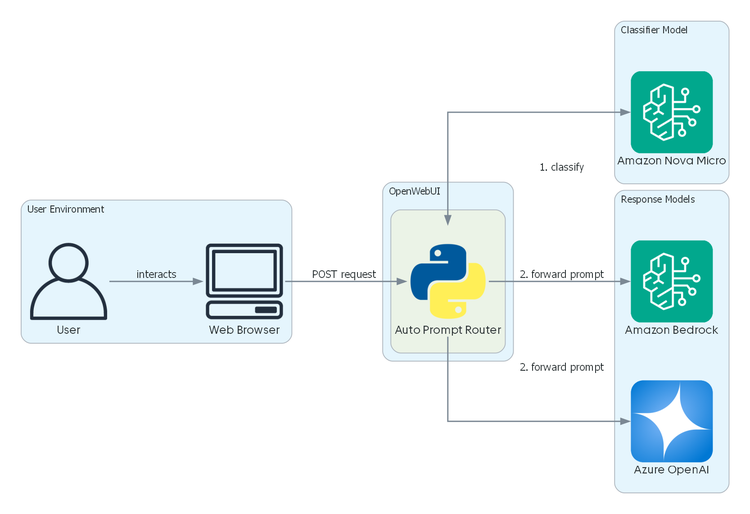
In this tutorial, we build the pipe from scratch: We sketch the architecture, explain the OpenWebUI "plugin" structure (Filters, Pipes, Valves), walk through the routing mapping step by step, and test locally against Bedrock before bringing the function into the UI. The goal is for you to understand this approach, extend it, and adapt it to your specific needs.
OpenWebUI as Internal AI Platform – Why We Rely on It
OpenWebUI has become our ideal foundation. The platform is self-hosted, maintains data privacy and compliance, and still integrates models from various providers – OpenAI, Anthropic, Mistral, you name it. This gives us a broad selection for different use cases without needing separate accounts with each provider. We've already published a deeper overview of the basic architectures in a separate article.
What particularly convinces us: extensibility through filters and pipes. These two types of functions can be added via the admin interface. Filters act as hooks before and after LLM calls – they can transform incoming messages or post-process outgoing responses and are placed upstream of a model or pipe. Pipes, on the other hand, are "own models" with their own logic: They appear in the model selector and can control external services/LLMs – in our case, the pipe handles the complete routing.
Through so-called valves, pipes are also configurable, such as setting standard models for specific categories or changing the classifier's ID. This is practical: We can swap models, extend categories, or enable/disable features without repackaging the pipe or deploying code.
For us, OpenWebUI combines the best of both worlds: user-friendliness (everyone can work directly with models) with technical control (we can centrally manage integrations, access rights, and security standards). This makes OpenWebUI a powerful hub where we can seamlessly dock custom extensions like the auto-routing pipe.
AWS Bedrock & Nova Micro – Our Setup Explained
While OpenWebUI handles the interface and orchestration, we need a service in the background that can reliably communicate with different models. This is exactly where AWS Bedrock comes in: As a managed service, Bedrock abstracts the model APIs of various manufacturers and offers a unified REST interface.
This brings us several advantages – unified billing, central rights management via IAM, and no proliferation of API keys. Instead of connecting each model individually, we integrated Bedrock once into the infrastructure and can address all available models via the Runtime API.
A highlight of Bedrock for us is the Amazon Nova family. Nova is Amazon's own model series and covers different performance classes – from Micro through Lite to Pro. For our auto-routing pipe, we deliberately use Nova Micro: a model optimized for high speed and extremely low costs. It's excellent for classification tasks where it's not about long, creative responses, but precise decisions: "Is this prompt Coding or Content?"
The key insight: Through upstream classification with Nova Micro, only the prompts that really need it run on a large model. For simple questions, a smaller model suffices; for complex analyses, GPT-4o or Claude is specifically activated. This pattern is not only technically elegant but also saves real money: classification costs about a thousandth of what generation with a premium model would consume.
Architecture of Our Auto-Routing Pipe
Our auto-routing pipe consists of three central building blocks that are clearly separated:
-
The router manages categories and assigns each one a target model. Examples are "default" for everyday questions, "coding" for technical prompts, "deep-reasoning" for complex tasks, or "vision" for image-based requests.
-
The classification is handled by Nova Micro. The model receives a compact system prompt listing all categories with brief descriptions and then returns exactly one category.
-
The execution depends on the mode. In OpenWebUI, the pipe is integrated and decides where the prompt is directed. In CLI test mode, we can run through the same flow locally with Bedrock to check logic and error scenarios.
With this separation of fast classification and targeted generation, the functional principle is established. Now we ensure it also works in practice: We set up the project, configure Bedrock (region, permissions, model IDs), choose cost-conscious defaults, and test the pipe locally before it moves to OpenWebUI.
Step 1: Project Foundation & Dependencies
Before we start with the actual logic, we set up a lean local environment. This way, we can test the routing in the CLI first and ensure that classification and mapping work as desired – only then do we lift the pipe into the UI.
We work with Python from version 3.10 and preferably use a fresh virtual environment. For local access to Bedrock, we install boto3: pip install boto3. The SDK handles the HTTP requests to the Bedrock Runtime API. Authentication runs via environment variables: AWS_ACCESS_KEY_ID, AWS_SECRET_ACCESS_KEY, and AWS_REGION (for us eu-central-1). The CLI uses the Bedrock Runtime endpoint directly.
For classification, we rely on Nova Micro. In the CLI, the model ID eu.amazon.nova-micro-v1:0 is used by default. It's important that the chosen ID matches the region, otherwise the call fails – this is, in our experience, one of the most common error sources in the first test.
In OpenWebUI itself, we don't need any configuration at this point. Later, we'll upload the pipe via the admin menu (Functions → New) and set up the associated valves like CLASSIFIER_MODEL_ID or the target models.
When these foundations are in place, we can define the categories in the next step and create the cost-conscious mapping in the router – the actual heart of auto-routing.
Step 2: Building the Router – Categories & Mapping
Here's where it gets concrete: The router is the heart of the pipe. Here we define which categories exist and which model each one points to. The categories form the "logic" of routing – without them, Nova Micro would know that something should be classified, but not which target models are available.
Our starting setup includes six categories:
-
default – for simple everyday questions
-
coding – for technical prompts
-
deep-reasoning – for complex tasks
-
structured-analysis – for longer, structured texts
-
content-generation – for creative or business content
-
vision – for prompts with image references
Each category comes with a brief description that Nova Micro receives in the system prompt. This enables the model to reliably categorize prompts:
self.categories = {
    "default": {
        "model": "azure.gpt-4o-mini",
        "description": "For everyday, relatively simple requests with short to medium "
                       "length (1–3 paragraphs). Covers small talk, short explanations, "
                       "summaries, or general questions that do not require deep reasoning."
    },
    "coding": {
        "model": "eu.anthropic.claude-sonnet-4",
        "description": "For technical requests related to programming, debugging, "
                       "architecture, or IT tools. Includes code snippets, error messages, "
                       "and in-depth technical explanations."
    },
    "deep-reasoning": {
        "model": "azure.gpt-4o",
        "description": "For complex analytical tasks requiring multi-step reasoning, "
                       "strategic analysis, or detailed problem-solving approaches."
    },
    # [...] and so on
}
This mapping is flexibly expandable: If new use cases arise in the company – such as translations or domain-specific analyses – additional categories can be added and routed to appropriate models. The descriptions should be precise but not too detailed – Nova Micro should be able to decide quickly, not ponder edge cases.
Step 3: Classification Prompt for Nova Micro
For Nova Micro to work reliably, we formulate a strictly structured system prompt. We deliberately use English so it aligns with common model expectations. It lists the categories with brief descriptions, forces a single output, and includes a short example:
system = (
    "You are a strict classification assistant. "
    "Choose EXACTLY ONE category from the allowed list. "
    "Return ONLY the category token in lowercase...\n\n"
    f"Valid categories: {valid_labels}\n\n"
    f"Categories:\n{descriptions}"
)
The prompt is deliberately kept strict: "EXACTLY ONE category", "ONLY the category token". This minimizes the risk of Nova Micro returning additional explanations or multiple categories.
For post-processing, we do brief normalization: We take the first non-empty line of the model response, trim spaces and quotes/backticks, and normalize the spelling (e.g., to lowercase, underscores to hyphens). This gives us a stable category name that the router can directly check against allowed categories.
Step 4: Runtime Detection – OpenWebUI vs. Local
Cleverly solved: Next, we ensure we can test the pipe locally without maintaining a second codebase. We deliberately keep the code unified: the same file runs as a pipe in OpenWebUI and as a CLI tool locally.
At runtime, we check via import detection whether OpenWebUI libraries are available and set a flag (e.g., OPENWEBUI). If the flag is set, we use internal OpenWebUI hooks (like generate_chat_completion); otherwise, we use the Bedrock Runtime API locally:
try:  # OpenWebUI runtime
    from open_webui.utils.chat import generate_chat_completion
    # [...] (further imports)
    OPENWEBUI = True
except ImportError:  # Local CLI runtime
    import boto3
    OPENWEBUI = False
This has two clear advantages: First, we test the complete routing logic before UI rollout – quickly and without risk for users. Second, we avoid duplicate implementations. For you, this means: We debug prompts, categories, and model IDs in the CLI first, and when everything is stable, we activate the pipe in OpenWebUI's admin area.
Step 5: CLI Testing – Testing the Routing
Before going to the UI, we verify the routing locally. The goal is a quick check whether classification and mapping work together: We start the script in CLI, input some typical prompts, and check whether the expected categories and target models are output.
Examples for our test:
-
"Please debug this Python error" → should become "coding"
-
"Summarize three bullet points in two sentences" → should become "default"
-
"Analyze this architecture idea in different variants" → should become "deep-reasoning"
For reproducible results, we set tight parameters on the classifier (temperature = 0.0, maxTokens ≈ 5). This keeps the response strictly to the category name and avoids unnecessary computation time.
We watch for three things during testing: First, whether each main category is hit cleanly at least once; second, whether edge cases (short code/text mixtures) are sensibly assigned; third, whether latency remains within the expected range (Nova Micro should respond under one second).
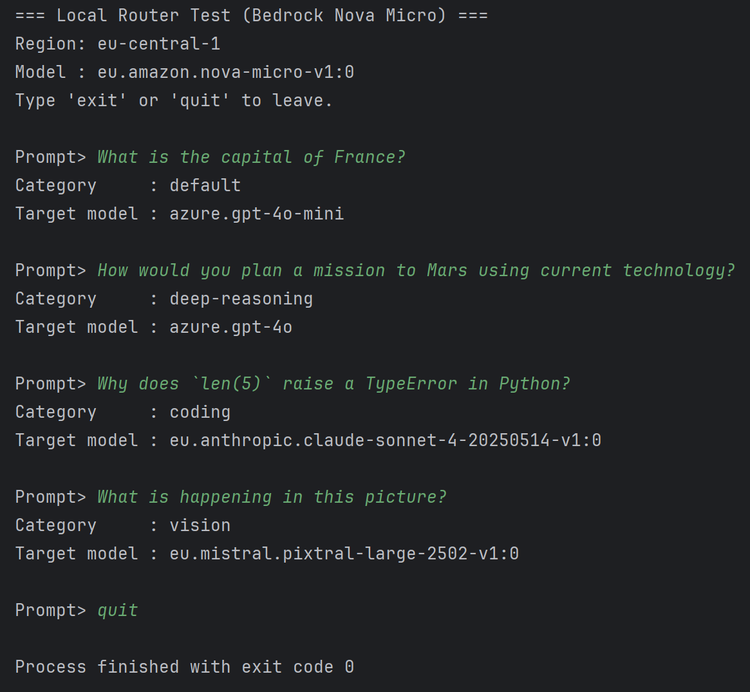
Common pitfalls are quickly fixed: Region and model ID must match (Nova Micro to the chosen AWS region), and the response may contain line breaks or whitespace, which we briefly normalize in evaluation (first meaningful line, trimming, lowercase). When these checks pass, the logic is stable enough for integration into OpenWebUI.
Step 6: Implementing the OpenWebUI Pipe (incl. Valves)
Now we integrate the tested logic as a pipe in OpenWebUI. A pipe is the runtime component that sits between input and model: It takes the last user message, calls the classifier first, and then sets the target model before the actual response is generated. Via the pipes() method, the class registers with an ID and display name; then it appears in the model selector (e.g., "Auto Prompt Router").
Valves are the configuration fields of a function/pipe in OpenWebUI – this is quite practical. They're typed (e.g., String, Boolean), visible in the admin UI, and changeable at runtime without needing to redeploy code. We use valves to set the classifier model (like amazon.nova-micro-v1:0), define target models per category (default, coding, deep-reasoning, content-generation, structured-analysis, vision), and optionally activate a switch that allows status hints. This way we can swap models, extend categories, or enable/disable features without repackaging the pipe – a real advantage in ongoing operations.
The flow in pipe() remains straightforward: We read the last user message from the request, build the classification prompt, call the classifier via OpenWebUI hooks, and minimally normalize the response (first meaningful line, trimming, lowercase, harmonize spelling). Then we check if the category is known, set body["model"] to the appropriate target model, and pass the unchanged prompt to generation. Details on error handling and security aspects follow in a later section.
async def pipe(self, body: dict, __user__: dict) -> str:
    # build the classifier request
    prompt = self._extract_last_user_message(body)
    classifier_request = self._build_classifier_request(prompt)

    # run it and process the response
    clf_response = await generate_chat_completion(
        __request__, classifier_request, user
    )
    raw_label = self._parse_classifier_label(clf_response)
    category = (raw_label or "").strip().lower()

    # set the model
    model_id = self.router.model_for(category)
    body["model"] = model_id

    # forward the initial prompt
    return await generate_chat_completion(__request__, body, user)
From a user perspective, the pipe appears in the model selector after upload (e.g., "Auto Prompt Router"). We test it there with the same prompts as in the CLI, adjust the valves as needed (classifier ID, target models), and are ready for productive use.
Step 7: Immediate Feedback for Users (Events)
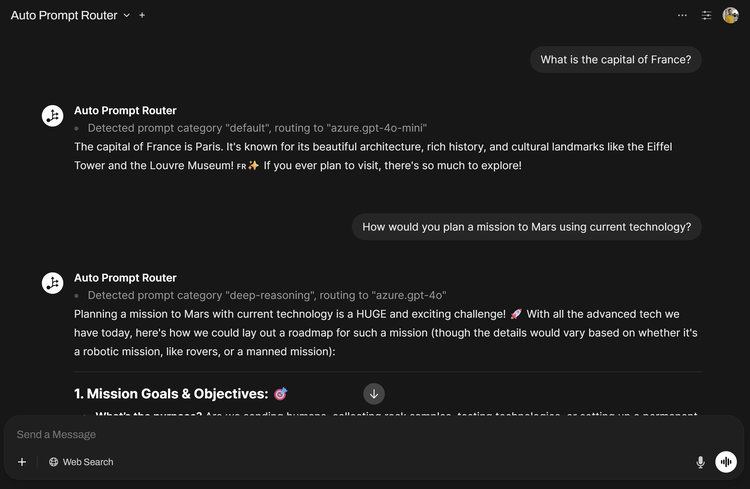
An auto-router initially seems like magic. Brief status messages create transparency and increase acceptance: As soon as the classifier has decided, we send a concise status message into the running stream, like "Category: coding → Model: Claude Sonnet". Users immediately see that something is happening while the actual response from the target model is still being generated. The perceived response time improves noticeably – and at the same time, trust grows that complex prompts actually land with the large reasoning models.
Technically, this runs via OpenWebUI's event system: The pipe receives an __event_emitter__. If our valve for status messages is active, we emit an event of type "status" directly after classification with a brief, easily readable description of the recognized category and chosen model. The event is non-blocking, displayed in the chat stream, and keeps the response pipeline free. It's important to keep the message deliberately concise (only category and model) – informative but without unnecessary details.
Step 8: OpenWebUI Upload via Web Interface
Now we lift the finished pipe into OpenWebUI. Admin rights are required; we bring the code directly through the interface – no file system access needed. Procedure:
-
In the admin area, go to Functions → New and create a new pipe function (name, description).
-
Insert the complete content of prompt_router.py into the editor and save.
-
Activate the function; it appears in the model selector, e.g., "Auto Prompt Router".
-
Check/set valves:
-
CLASSIFIER_MODEL_ID (e.g., eu.amazon.nova-micro-v1:0)
-
Target models per category (MODEL_DEFAULT, MODEL_CODING, MODEL_DEEP, MODEL_STRUCT, MODEL_CONTENT, MODEL_VISION)
-
optionally ROUTING_STATUS_ENABLED for brief status messages in chat
-
Tip from practice: Make sure model IDs match the region (especially when switching between local testing and UI operation). The IDs are case-sensitive and must exactly match the Bedrock notation.
Testing in the UI: select "Auto Prompt Router", send typical prompts (coding, default, deep-reasoning), and check whether category and target model are assigned as expected. If activated, a brief status message with recognized category and chosen model appears directly after classification – this allows you to verify the feedback behavior immediately.
Error Behavior: Deliberately Kept Simple
Brief experience report from implementation: We run a "fail fast" behavior. If the classifier delivers an unexpected format or returns an unknown category, we abort with a clear error. There are no silent fallbacks to "default" and no hidden corrections; the status events from step 7 are pure transparency, not error handling.
Why so strict? The system runs internally – here it's more helpful to make errors immediately visible rather than mask them. This keeps the code lean, maintainable, and easy to debug (KISS principle). And if it fails in individual cases, users can always manually select a specific model, even in the middle of a conversation. This keeps the workflow manageable despite deliberately simple error handling.
If you need more safeguards later (e.g., soft fallbacks, retries, timeouts, or synonym mappings), this can be specifically added. However, the current version prioritizes simplicity and comprehensibility – qualities that have proven more valuable in practice than sophisticated error handling.
Cost Example: Break-even After Few Prompts
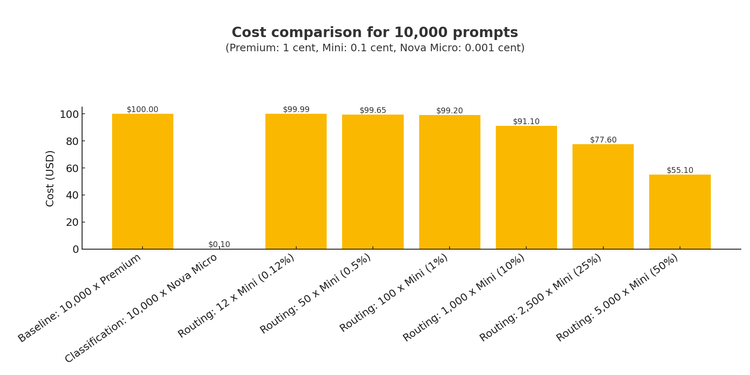
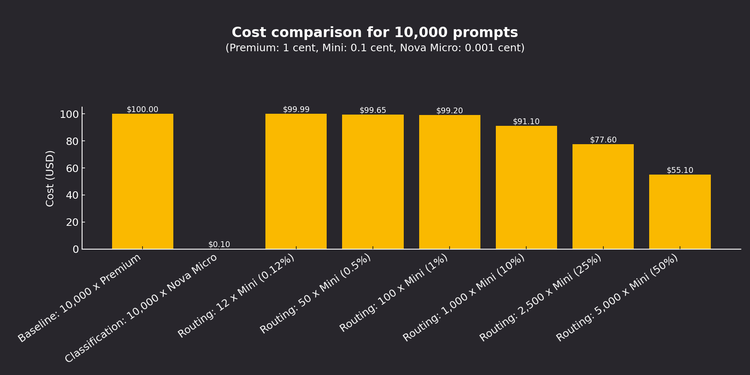
For a rough, easily digestible cost-effectiveness calculation, we take the following round assumptions (per prompt, highly simplified and thought of on average; prices vary by region/mode – we're concerned with the principle here):
-
Premium models (e.g., Claude or GPT-4o): about 1 cent
-
Small model (e.g., GPT-4o mini): about 0.1 cent
-
Classification with Nova Micro: about 0.001 cent per prompt
Now we calculate with 10,000 prompts:
-
Classifying all 10,000 prompts via Nova costs about 10 cents total.
-
If we run a prompt through the small model instead of premium, we save 0.9 cents (1.0 − 0.1).
-
This means: Starting from about 12 rerouted prompts (12 × 0.9 cents = 10.8 cents), we have fully compensated for the 10-cent classification costs – everything beyond that is pure cost advantage.
Takeaway: The break-even is extremely low. In practice, just a few "light" prompts (e.g., short confirmations, "thanks", mini follow-up questions) running through a cheap model are enough for the upstream routing with Nova Micro to clearly pay off. In our internal deployment, we saw a measurable cost advantage after just a few days.
Conclusion: Quality, Transparency, and Costs in Balance
We built an auto-routing pipe that delivers exactly what teams need in practice: simplified operation, comprehensible decisions, and controllable costs. The path there is deliberately lean: We test locally, then integrate as a pipe in OpenWebUI, control everything via valves, and optionally provide immediate feedback via event stream. This noticeably reduces friction – no one has to manually choose a model anymore, and it's always visible where routing occurred.
Technically, the solution remains low-maintenance: clear classification prompt, compact router, KISS-based error behavior with "fail fast". Economically, the effect is quickly measurable: Because Nova Micro is extremely cheap, the break-even is practically at a few light prompts per thousand requests. For us, this is the pragmatic way to scale AI internally: better user experience, less complexity, and costs that remain plannable.
Simon Bönisch, November 2025