
Introduction
A complete website redesign and relaunch is a huge task and the launch of Edge Delivery Services in late 2023 gave us the stimulus to dare taking this big step. We wanted to develop our website using the latest Adobe technology and chose Edge Delivery Services for this reason. Our website before that had served us very well since 2017, still looked fresh after all these years and represented our company very well.
The first stimuli for a website relaunch came in 2023/24; a technoological and visual restart was supposed to inspire new creative ideas. The new website was supposed to become more dynamic, more transactional, more interactive and more engaging.
Now we had to explore how our requirements could be implemented with Edge Delivery Services and which tools and possibilities Adobe is offering us to implement the most complex of requirements.
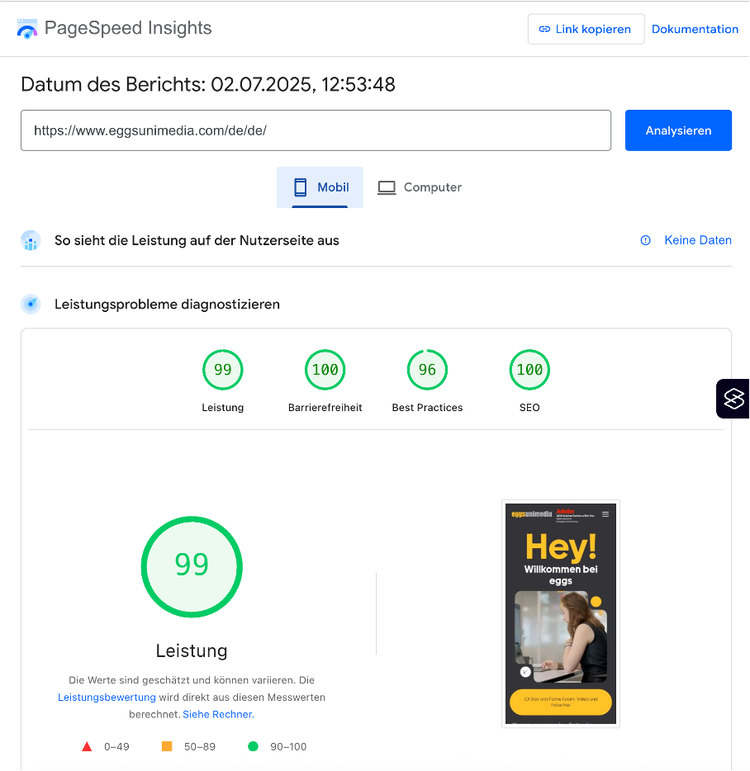
We paid a lot of attention to the Lighthouse score, especially the performance. With Edge Delivery Services (a term derived from „edge computing“, a technology for the decentralized processing and delivery of data across CDN networks), Adobe is promising a performance score of close to 100. Of course we wanted to represent this promise in the performance of our website.
Technical implementation
The first question we’d asked ourselves was which authoring method we wanted to use. Edge Delivery Services offers multiple options here; from document based authoring over to document authoring with da-live all the way to AEM based authoring inside AEMaaCS with the Universal Editor. Adobe also offers Headless solutions, so that we can choose between different approaches in a flexible way.
Because we had worked with the AEM UI for so many years at that point and found a lot of joy in using it, we decided that we didn’t want to stop using that and chose developing our website using the Universal Editor.
The Universal Editor is not a 1:1 copy of the AEM Sites page editor. The visually similar Universal Editor is a powerful tool for content authors. The user experience is a little bit different and is also not a „feature complete“ of the AEM sites page editor in that sense. The missing responsive grid, which allows authors to scale components to fit different screen and windows sizes and place components next to each other, is an example for this. This flexibility isn’t being offered by the Universal Editor. That’s why we had to rethink the development of visually more complex components like the Article Parallax block from our usual approach to component development.
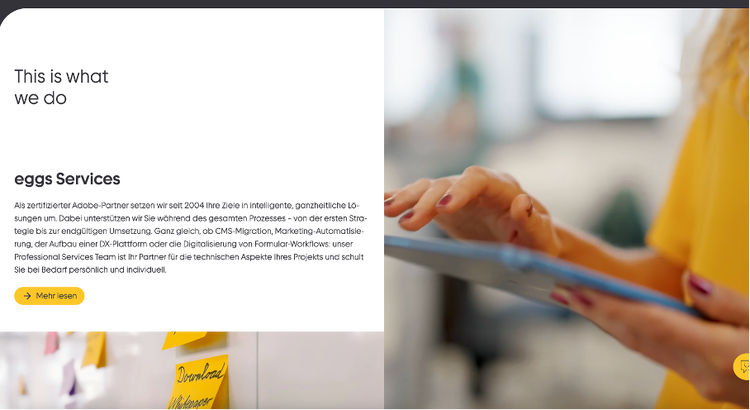
The parallax effect was developed using a 2 column structure, which the author can use to author the background video/image and two text blocks with accompanying images. Adobe Edge Delivery Services initially renders the content as simple, sequential HTML elements which the code then reorganises into two columns through DOM manipulation: the left side of the component features the vertical positioning of text and images and the right side featurest he fixed video / image with a parallax effect.
The authoring experience allows the indivdual configuration of each component (headlines, text, images, links and even an optional Google Maps integration) without forcing the author to deal with complex layout structures.
Adobe Managed CDN
Because all our authoring happens in the Universal Editor now, this allows us to use Adobe Managed CDN to deliver our content quickly and without any delays to our page visitors. The CDN configuration is located in our AEMaaCS repo though, unlike the code for the Edge Delivery Services project, which is located in its seperate repo.
The cdn config is located in the AEMaaCS repo under /config in the root directory. It is then being deployed with a config deployment pipeline in the Cloud Manager.
Due to the config being located on the AEM Publish instance by default, our Edge Delivery Services environment is defined as origin within it, serviing all traffic through the Edge Delivery Services instance.
With our relaunch we also introduced international regions and locales (de_DE).
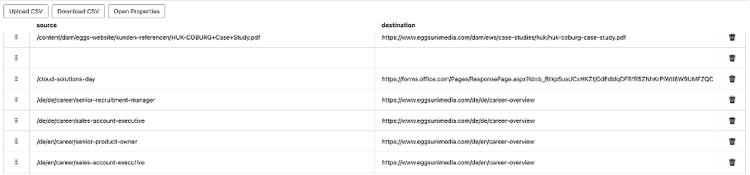
The cdn.yaml offers us powerful redirect configuration tools which were of enormous help for switching from our old domains eggs.de for Germany and eggs.ro for Romania to our new domain eggsunimedia.com
kind: "CDN"
version: "1"
metadata:
envTypes: ["prod"]
data:
origins:
- name: "eds-origin"
domain: "main--repo--owner.aem.live"
originSelectors:
rules:
- name: "route-to-eds"
when:
allOf:
- reqProperty: tier
equals: "publish"
- reqProperty: domain
equals: "www.new-domain.com"
action:
type: selectOrigin
originName: "eds-origin"
redirects:
rules:
- name: "legacy-to-new-redirect"
when:
reqProperty: domain
equals: "www.legacy-domain.com"
action:
type: redirect
status: 301
location: "https://www.new-domain.com{reqProperty: path}"
Lighthouse Score
The Google Lighthouse Score, a free tool for measuring the quality and performance of a website, ranks different areas of a website like the performance, the SEO score, best practices and accessibility.
A high LIghthouse Score means that the own website loads quickly, is user-friendly and is functional without any major issues and therefore offers a better user experience, leading to a lower bounce rate.
Edge Delivery Services supports this with fast and efficient edge caching, automatic image optimization and efficient content delivery ensures that our website is loaded very quickly and always has a perfect Lighthouse Score.
-
Edge Caching & CDN: Content is globally delivered through CDN caching, which leads to fast loading times
-
Optimized HTML delivery: HTML is rendered on the edge (server side rendering), which drastically reduces the Time To First Byte (TTFB)
-
Image Optimization: Images are automatically delivered in modern formats (like WebP) and fitting sizes
-
Minification: JS-Code and CSS-Stylesheets are minified
An obvious detail that I haven’t mentioned at all so far is the frequent use of video assets on our website. The optimized delivery of videos is not supported by Edge Delivery Services out of the box as it is with image assets. Therefore we’ll take a look how we implemented this feature in the next chapter.
Integration of Dynamic Media for Videos
In contrast to image assets, there is standard blocks offered by Edge Delivery Services that allow for an easy integration of videos through Dynamic Media. For this reason we integrated and configured Dynamic Media videos manually.
This took up additional development effort and forced us to gather the video asset programmitically from the Dynamic Media server. The effort put in paid off though – Dynamic Media offers a very performant and adaptive video delivery feature that works perfectly with Edge Delivery Services and therefore contributes to a great user experience.
async function _createVideo_(videoPath: string, block: HTMLElement, cssClass: string): Promise<HTMLElement> {
try {
const DM_VIDEO_URL = `${DM_VIDEO_SERVER_URL}/eggsserver/${videoPath}`;
const DM_POSTER_URL = `${DM_SERVER_URL}/eggsserver/${videoPath}?bfc=on&fmt=webp&qlt=${preloadQuality}&wid=${posterImageWidth}`;
const videoProfiles = [
{ width: mobileResolution, url: `${DM_VIDEO_URL}-0x360-785k` },
{ width: tabletResolution, url: `${DM_VIDEO_URL}-0x540-2135k` },
{ width: desktopMediumResolution, url: `${DM_VIDEO_URL}-0x1080-4800k` },
];
const selectedProfile = videoProfiles.reduce((best, current) => {
return posterImageWidth >= current.width && current.width > best.width ? current : best;
}, videoProfiles[0]);
const videoContainer = document.createElement('div');
videoContainer.dataset.component = 'video-container';
videoContainer.classList.add(cssClass);
const videoElement = document.createElement('video');
videoElement.muted = true;
videoElement.loop = true;
videoElement.controls = false;
videoElement.preload = isAEMEditor ? 'none' : 'auto';
videoElement.setAttribute('muted', '');
videoElement.setAttribute('aria-hidden', 'true');
videoElement.setAttribute('playsinline', 'true');
videoElement.setAttribute('webkit-playsinline', 'true');
videoElement.setAttribute('fetchpriority', 'low');
videoElement.poster = DM_POSTER_URL;
const source = document.createElement('source');
source.src = selectedProfile.url;
source.type = 'video/mp4';
videoElement.appendChild(source);
videoContainer.appendChild(videoElement);
block.appendChild(videoContainer);
if (!isSafariBrowser) {
videoElement.load();
}
videoElement.play().catch((err) => {
console.error('Autoplay failed:', err);
});
return block;
} catch (error) {
console.error('Error creating video:', error);
throw error;
}
}
A huge advantage here is Smart Cropping. With the help of AI, Dynamic Media automatically recognizes the most essential image areas and crops videos and images accordingly, so that they are perfectly displayed on all devices and the relevant part oft he asset remains in focus. This ensures that a video depicting a person always keeps the subject in focus, not the irrelevant background, wihch improves quality and performance on all devices.
Challenges & Learnings
Our inhouse website team spent years working classic AEM projects, which is why switching to Edge Delivery Services came with a learning curve.
Edge Delivery Services comes with a rich documentation (https://www.aem.live/), which made progress and learning a lot faster and allowed the team to implement features faster. We got introduced to new tooling concepts, that are vastly different from classic AEM projects.
Unlike classic AEM projects, Edge Delivery Services forces you to implement a lot of features manually again – but now much faster and more efficient. AEM allowed you to reuse powerful Core Components. We also had to rethink how to deliver the markup, which is completely delivered by Edge Delivery Services now and only requires clientside „decoration“ now.
export default function _decorate_(block: HTMLElement): void {
if (block) {
const childrenArray = Array.from(block.children);
for (let i = 0; i < childrenArray.length; i += 3) {
const row = document.createElement('div');
row.classList.add(`${blockName}__row`);
childrenArray.slice(i, i + 3).forEach((child) => {
child.classList.add(`${blockName}__card-container`);
child.innerHTML = _generateCardDom_(Array.from(child.children), blockName);
row.appendChild(child);
});
if (row.innerHTML.trim()) {
block.appendChild(row);
}
}
}
}
We were really surprised to learn how much the architecture of an Edge Delivery Service differs from a classic AEM setup and how much this affects daily work. This rethinking from working with a monolithic system moving over to working with block based content modules changed our approach in a fundamental way.
With Edge Delivery Services, the impressive but also very complex and maintenance intensive and highly modular architecture OSGI bundles is gone entirely. While a lot of backend functionalities in AEM were covered by OSGI services and servlets (like mail sending for contact forms), these are entirely handled by Adobe App Builder actions now.
This reduces development complexity and the focus shifts to fast and performant rendering, as well as a leaner, more modular frontend development process.
Features like GraphQL and SQL2 queries, which were used on our team- and blog overview pages, are also replaced by the Helix query, which indexes the entire page content.
insights-de-de:
include:
- /de/de/insights/**
exclude:
- /de/de/insights
- /de/de/insights/blog
- /de/de/insights/events
- /de/de/insights/news
- /de/de/insights/success-story
- /content/**
target: /de/de/insights-index.json
properties:
insightsImage:
select: head > meta[property="og:image"]
value: attribute(el, "content")
insightsImageAlt:
select: head > meta[property="og:image :alt"]
value: attribute(el, "content")
insightsTitle:
select: head > meta[property="og:title"]
value: attribute(el, "content")
insightsAuthor:
select: head > meta[name="insights-author"]
value: attribute(el, "content")
insightsTags:
select: head > meta[name="insights-tags"]
value: attribute(el, "content")
insightsIntro:
select: head > meta[name="insights-intro"]
value: attribute(el, "content")
insightsCategory:
select: head > meta[name="insights-category"]
value: attribute(el, "content")
insightsPublishDate:
select: head > meta[name="insights-publish-date"]
value: attribute(el, "content")
Conclusion
Our project showed how crucial it is to regularly observe the EDS ecosystem to stay up to date, to contiously learn about new features and to integrate updates as early as possible. This platform has very short innovation cycles, which is a big plus. New features and possibilities arrive all the time.
Continuous effort to optimize the performance and stability and the website is mandatory here though.
Powerful tools like Edge Delivery Services, the Adobe App Builder and Dynamic Media work in unison to significantly improve the flexibility, performance of our website. While AEM set the standard for a very long time, Edge Delivery Services allows for leaner code and moves the majority of the necessary work into the Frontend.
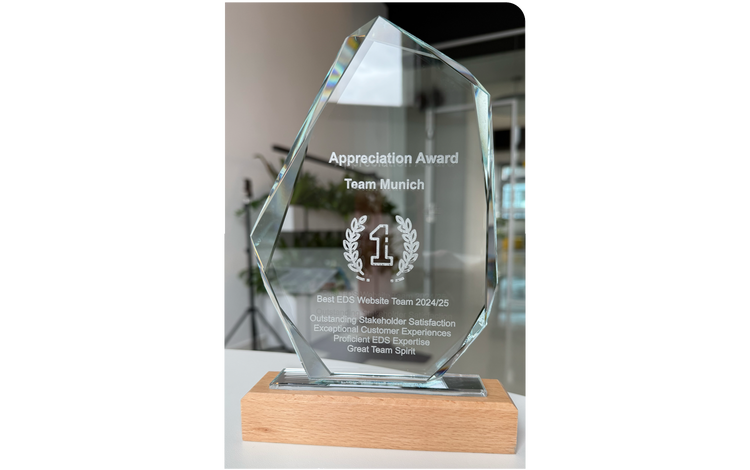
This transition requires a lot of rethinking at first but the advantages like maintainability, scaleability and innovation pace quickly present themselves. In total we are convinced that made the right decision with Edge Delivery Services and established the foundation for a future proof solution that allows us to remain performant and flexible.
In conclusion, we see the successful implementation of our new website as a very valuable experience, whose insights we can and will apply to future projects. Now we’re closer than ever to our goal of establishing a reuseable setup with proven patterns.
Autor: Christian Eberhardt, eggs unimedia