Adobe LLM Optimizer
How to secure your brand in the era of AI-powered search

Adobe LLM Optimizer
The digital landscape is changing rapidly. While companies have invested in traditional search engine optimization (SEO) for years, the proliferation of AI-powered search tools presents brands with entirely new challenges. Generative AI engines such as ChatGPT, Gemini, and Perplexity answer user queries directly – without users ever having to visit your website. According to Gartner, around 50% of today's web traffic will disappear by 2028 because users are increasingly interacting via AI systems. So the crucial question is: Is your brand mentioned in these AI responses? Organizations should consider how AI visibility complements their existing digital presence strategy.
This marks the birth of Generative Engine Optimization (GEO), the optimization of content so that it is cited in AI-generated responses. Unlike SEO, which is about ranking in Google search results, GEO ensures that AI systems incorporate your brand, links, and insights into their responses.
While SEO focuses on search engine rankings, GEO aims to increase the probability of your content being referenced in AI-generated responses.
Adobe now offers the LLM Optimizer, a solution that allows you to check and optimize your visibility in LLMs. And best of all, you can try the tool for free. But more on that at the end of the article.
Adobe LLM Optimizer – explained briefly
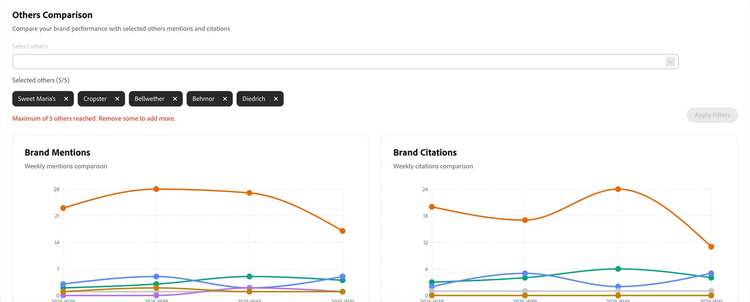
With Adobe LLM Optimizer, Adobe is launching an innovative tool that helps brands analyze and optimize their visibility and impact in the world of large language models (LLMs). The Optimizer provides valuable insights into visibility, i.e., how present a company and its products are in AI models. It also examines how often a brand is mentioned in this context (brand mentions) and to what extent it is referred to as a source or reference (citations). While brand mentions capture pure name mentions, citations show whether and how the company's content or statements are actually used in LLMs. This is supplemented by a sentiment analysis that shows how the brand is being talked about: positively, neutrally, or negatively. The Adobe LLM Optimizer thus creates a completely new basis for strategically managing brand communication, AI training, and digital reputation.
First steps in LLM optimization
The LLM Optimizer Chrome plugin is a great way to get started with LLM optimization. This free tool, available in the Chrome Web Store, provides an initial overview of how your website is perceived by large language models. For meaningful results, it is recommended to analyze not only the home page but also subpages – this will give you a more comprehensive picture of visibility and brand perception within LLMs.

Get started in a playful way: The LLM Optimizer Playground
If you would like to try out the LLM Optimizer without obligation, the LLM Optimizer Playground is the ideal place to start. At https://play.llmo.now/, you can experience the features live using the fictional brand “Frescopa Coffee”.
The public demo allows you to explore the user interface and test the key features without registering. Observe how the LLM Optimizer analyzes content, provides optimization suggestions, and improves placement in AI-generated responses. This will give you a good feel for the tool's capabilities before you take advantage of the full “Try Before You Buy” offer for your own domain.
From search queries to LLM questions with the help of Google Search Console:
Another useful step at the beginning of an LLM Optimizer project is to analyze the keywords from Google Search Console. There you can see which terms users have searched for in the past and which pages they subsequently visited. This data provides valuable insights into which topics and content are actually relevant to your target audience.
Based on these keywords, LLMs can then be used to formulate questions in the same way that language models would ask or answer them. These questions can be uploaded to the LLM Optimizer in CSV format, creating a solid, data-driven starting point right from the beginning of the project. This seamlessly combines the classic SEO perspective with the new discipline of LLM optimization – a crucial step in making your brand visible in AI-generated responses.
Here's how to do it:
- In Google Search Console, go to Performance and then Search Queries.
- Apply a regex filter (see Appendix Example 1) to the search queries.
- Export the results and use LLMs to formulate them as question-based keywords (see Appendix Example 2).
- Upload the questions as a CSV file to the LLM Optimizer to check how LLMs respond to similar questions.
Adobe LLM Optimizer: Try Before You Buy
Adobe offers all AEM Cloud customers—regardless of whether they use Sites, Forms, or Assets, and for both AEM as a Cloud Service and AEM Managed Service—the opportunity to test the LLM Optimizer free of charge. The offer includes access to 200 prompts, with usage limited to one domain. This provides customers with an ideal basis for a proof of concept or pilot project. Activation is particularly easy and can be done via the Adobe Experience Hub or at llmo.now.
How to get started with the “Try Before You Buy” offer
You can get started with LLM Optimizer in just a few steps:
- Activate via Adobe Experience Hub or directly via llmo.now
- Enter your internet domain and brand
Important to know: The domain you select for your test will be used by all users in your organization and cannot be changed later. Therefore, choose your most important web domain strategically. - Optional: Upload CDN logs for better performance
- Start with predefined, generic prompts or enter specific prompts (e.g., for a single campaign)
Look forward to the following three core functions of the LLM Optimizer
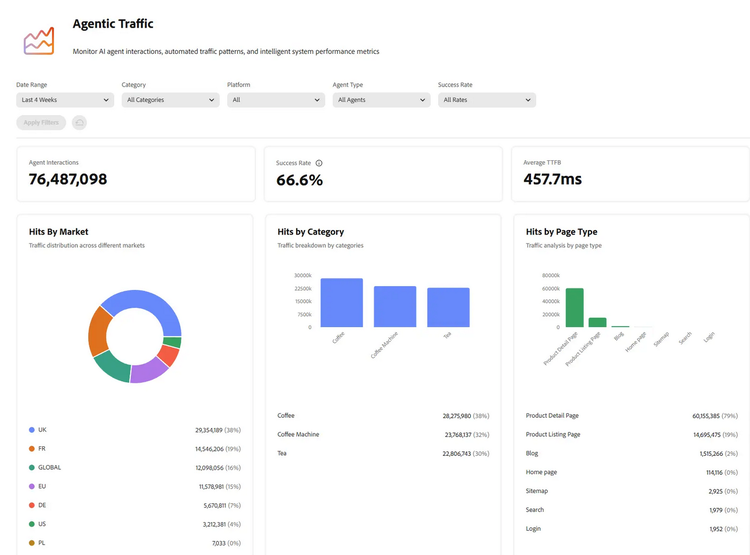
(1.) Measuring and benchmarking AI-driven traffic and citations
The LLM Optimizer identifies your content that is used by AI interfaces to respond to user queries. You will learn:
- which of your digital assets are prioritized by LLMs
- how AI references change over time
- how your visibility compares to competitors for important search queries
(2.) Optimizing content to improve visibility
The LLM Optimizer has already been available to various early access customers in recent months. The results showed that 80% of companies have “business-critical” gaps in content visibility that can be closed with the help of the LLM Optimizer.
The LLM Optimizer:
- detects gaps in brand visibility
- suggests improvements for your own channels (websites, FAQs) and external channels (Wikipedia, forums)
- automatically identifies areas of your website that are invisible to LLMs
- enables one-click review, approval, and implementation of optimizations
(3.) Proof of business value
The LLM Optimizer offers attribution that combines AI visibility with user behavior and business performance, i.e., it
- shows effects on engagement and conversion
-
provides ready-made reports for quick insight
-
helps prioritize optimizations with the greatest potential
Impressive results at Adobe too
Adobe itself uses the LLM Optimizer for its GEO strategy and has achieved impressive results:
- 5-fold increase in citations for Adobe Firefly within a week
- 200% higher LLM visibility for Adobe Acrobat compared to competitors
- 41% increase in LLM-referred traffic to Adobe.com
These figures underscore the growing importance of AI-generated traffic. In September 2025, Adobe observed a 1,100% year-over-year increase in AI traffic to US retail sites. Visitors from generative AI sources were also 12% more engaged and had a 5% higher conversion rate than visitors from traditional traffic sources.
Conclusion: It pays to act now
AI search is fundamentally changing how people discover information and make purchasing decisions. With Adobe's free “Try Before You Buy” offer, you can test the LLM Optimizer and take the first steps toward a successful GEO strategy.
LLM Optimizer is available as a standalone application and integrates seamlessly with Adobe Experience Manager Sites. It supports standards such as Agent-to-Agent (A2A) and Model Context Protocol (MCP), enabling smooth interoperability with workflows in third-party solutions.
Appendix
Sample 1:
Sample prompt for Google Search Console:
(Regex filter Regex for recognizing questions (multilingual English, Portuguese, Spanish))
(?i)^(who|what|when|where|why|how(\s+(to|do|does|did|can|could|should|would|is|are|was|were|much|many|long|often|far|late|old))?
|which|whom|whose|is|are|am|was|were|do|does|did|can|could|should|would|will|has|have|had|may|might|must|quem|que|o\s+que|qual|quais|quando|onde|por\s+que|por\s+quê|porque|porquê|como|quanto|quantos|quanta|quantas|qué|quién|quiénes|cuál|cuáles|cuándo|dónde|por\s+qué|cómo|cuánto|cuánta|cuántos|cuántas|para\s+qué)\b.*\??$
Promt for Bing Webmaster Tools:
 =LET(s,LOWER(TRIM(A2)), w,TEXTBEFORE(s," "),IF(OR(RIGHT(s,1)="?",
ISNUMBER(XMATCH(w,{"who","what","when","where","why","how","is","are","am","was","were","do","does","did","can","could","should","would","will","may","might"}))),TRUE,FALSE))
Sample 2:
LLM prompt for creating relevant questions:
You are an expert in Generative Engine Optimization (GEO) and LLM visibility analysis.
Your task is to create 200 high-quality prompts that reflect how real users naturally ask AI assistants (ChatGPT, Gemini, Perplexity, Copilot, etc.) about a company’s products, services, or related topics.
These prompts will be monitored in Adobe LLM Optimizer.
Input parameters:
- Brand name: {{Brand_Name}}
- Website URL: {{Website_URL}}
- Language: {{Language}}
- Country focus: {{Country}}
Instructions:
1. Analyze the brand’s website structure, topics, and customer intent based on the URL.
2. Create prompts that mirror authentic user behavior, in the given language and country-specific phrasing.
3. Include real-world examples relevant to the brand’s market, products, or competitors.
4. Cover the full customer journey:
- Awareness (educational, problem-focused)
- Consideration (comparison, evaluation)
- Decision (purchase, pricing, or support)
5. Group prompts into logical categories and topics based on the site’s content.
6. Ensure **20–30% of all prompts are branded**, explicitly mentioning {{Brand_Name}}.
The remaining prompts should be unbranded, focusing on general user intent within the same domain.
7. Ensure all prompts are:
- Factually correct (no hallucinations)
- Unique and diverse
- Aligned with real user search or conversational intent
8. The region column must match the country focus.
9. Only deliver the CSV output — no commentary, no explanations.
Output format (CSV):
category,topic,prompt,region
Products,PDF Conversion,"What’s the best tool to convert a PDF to Word?",Switzerland
Brand Visibility,Reputation,"Is {{Brand_Name}} a trusted document management tool?",Switzerland
Comparisons,Competitors,"How does {{Brand_Name}} compare to Adobe Acrobat?",Switzerland
Support,Help Topics,"How can I merge PDFs using {{Brand_Name}}?",Switzerland
Educational,Use Cases,"Can AI tools like {{Brand_Name}} help improve productivity?",Switzerland